
If you are into high-end home theater, check out our Display and Audio Calibration Guides to maximize your experience.
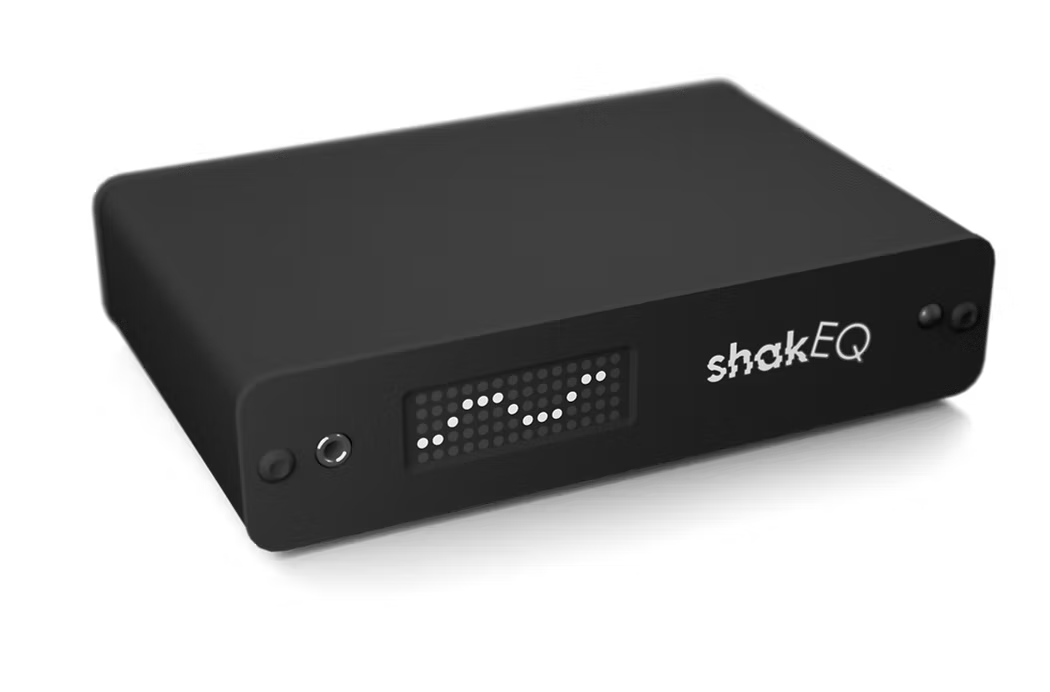
Summary Verdict: The DSPeaker ShakEQ is the first and only DSP purpose-built for tactile transducers—and it shows. For anyone using bass shakers like Crowson, ButtKicker, Aura Pros, or Dayton Audio shakers and pucks, this is a transformative hardware upgrade. If you’re not running BEQ, ShakEQ is a must-buy. If you’re already deep into a MiniDSP + BEQ system, it’s still compelling—especially now that BEQ overlay support exists. Here’s our in-depth technical analysis of what makes the ShakEQ so powerful, what’s missing, and how it compares to DIY setups.
What’s in the Box: DSPeaker Takes the Purpose-Built Route
Out of the box, ShakEQ feels pro-grade and tightly bundled:
- ShakEQ DSP hardware (miniDSP 2×4 HD size; all-metal shell)
- Remote control (full operation via IR remote)
- Pair of sensor pucks with TRS cable for tactile measurement
- Power supply
- Quick-start and online setup guide
- Service USB port for exporting frequency curves and updating firmware


No frills, no distractions—everything included is built to support tactile calibration, not general audio processing.
🔧 Score: 9/10 – Intuitive packaging with excellent build quality.
Why ShakEQ Matters: The Problem with Bass Shakers (and Why This Fixes It)
Most low-frequency content in modern streaming and disc releases is rolled off under 30–40 Hz. That’s bad news for transducers, which rely on deep bass to do their job. Traditional workarounds include MiniDSP with Bass EQ (BEQ) to manually undo the studio high-pass filters—but that assumes…
- You want curated filters per title.
- You’re comfortable with signal chains and messing with a separate unit (MiniDSP).
- You’re not trying to EQ based on what the seat is doing (which BEQ doesn’t account for – you’d need to EQ that separately)
ShakEQ fixes that by moving away from speaker-style EQ and focusing on the seat itself:
- The sensor puck captures structural vibration under you.
- ShakEQ calibrates what your body feels, not what a mic hears in the room.
- It then enriches and controls what hits your transducers—even when your source material doesn’t have that bass to begin with.
✔️ This is the missing tool for shakers, and it targets two core issues:
- Uneven tactile sensation due to bass shaker and seat resonances.
- Lack of usable low-end from modern content (dspeaker.com).
🔧 Score: 10/10 – Purpose-built for a problem no one else fully addressed.

Key Features with Real-World Engineering Benefits
🎯 Automatic Equalization for the Seat
Running three sweeps (each with your body shifted ~10 cm) creates a calibration curve that:
- Cancels narrow resonances like seat-frame ringing at 40–60 Hz.
- Evens out perceived force from the shakers.
- Prevents overdriving on peaks—essential for smaller pucks like Dayton Audio models, which have a strong ~50 Hz resonance.
You can even export the “before/after” EQ plots as pictures via USB to visualise the results. Very handy!
🌊 Bass Extender: Spectral Enrichment for Missing LF
Unlike traditional EQ boosts, ShakEQ features a “Wetness” adjustment feature, which:
- Generates low-frequency energy rather than just raising gain.
- Uses mid-bass (~60–120 Hz) cues to create new ULF data in the 10–40 Hz range.
- Varies based on content, avoiding that all too familiar “one-note rumble.”
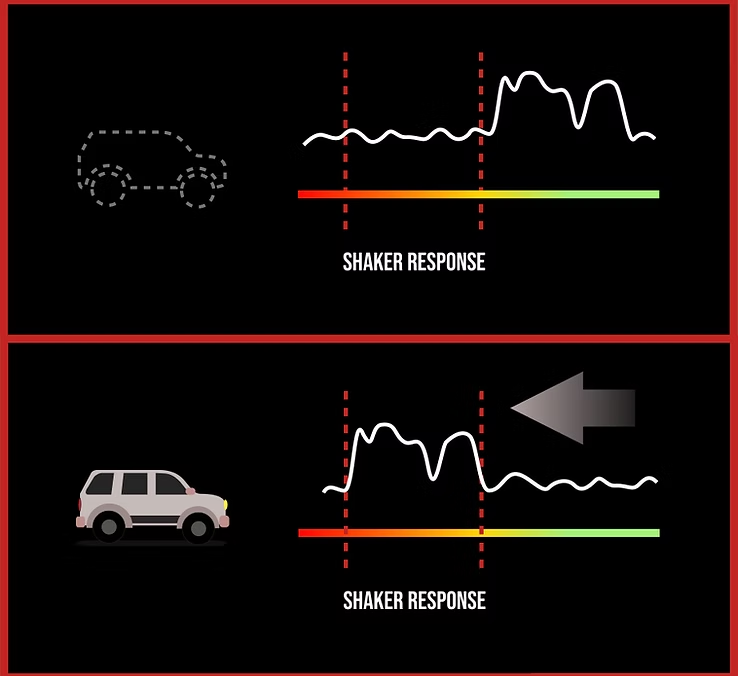
This makes your seat feel alive, even on low-end-anaemic movies or filtered streaming tracks.
This feature is really excellent as I don’t like to set my bass shakers to cover anything above 60Hz – whether the large ones under the back row, or the small ones embedded in the front seats. I find that way too distracting TBH. So allowing higher frequency cues to be generated in the 10 – 40Hz range is excellent as it keeps the vibrations in the lower frequencies while still responding to higher-level output.
Thankfully, you can feed in a full-range signal, set the low-pass filter to your liking and then adjust this feature using the wetness adjustment on the unit.
🎚️ Dynamic Range Optimizer (DRO)
Standard compressors don’t suit transducers—their job is to protect speakers, not enhance feel. The DRO used here is:
- Context-aware, not a simple threshold limiter.
- Enhances low-level rumble without stepping on heavy hits.
- Transparent during high-dynamic sequences, meaning it doesn’t fight the movie.
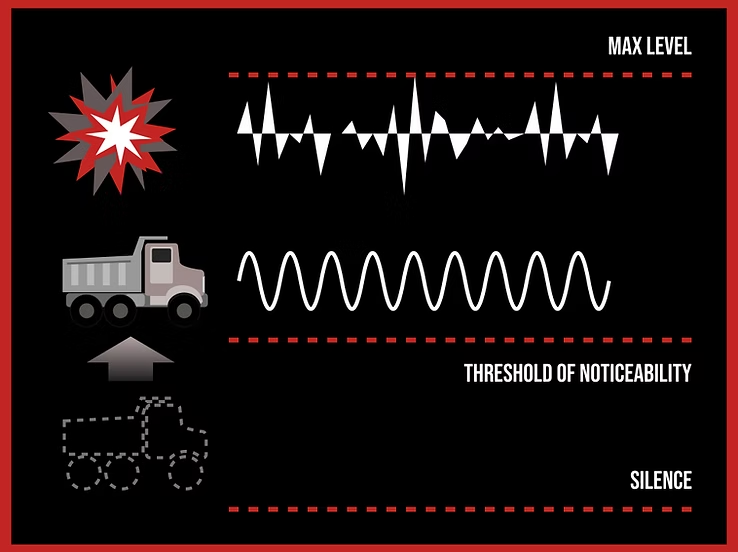
I was surprised how well this feature worked with my smaller Dayton Pucks embedded into the front-row seats. The pucks are very easy to over-drive and tend to bottom out frequently with my usual setup. However, with the ShakEQ installed, I could drive them much more aggressively without feeling distortion or bottoming them out. Excellent!
🔁 Anti-Mode for Subwoofer Integration
Building on DSPeaker’s pedigree from the Anti-Mode X4 family (ampreviews.us), ShakEQ brings that same room correction tech to your sub if you route your LFE through it. This can:
- Removes room boom/modes from your sub.
- Keeps tactile and audible bass in sync.
- Adds automatic time alignment between shaker and sub paths—one of the most overlooked but quite critical tuning steps.
To be honest, this is not something I need as my subwoofers are calibrated to an inch of their life using a MiniDSP unit, and are seen as one unit by Dirac and / or Audyssey. However, there is the ability to manually set delay just for the shakers, which is very handy if you don’t want to feed in the subwoofer signal.
🔧 Score: 10/10 – Every feature exists for a reason and is executed with restraint and purpose.

Setup: Surprisingly Smooth With the Right Walkthrough
At first glance, setting up ShakEQ may feel daunting. But if you follow the steps in the guide, it’s quite simple really.
- Update Firmware: Use USB stick → Standby Mode → Remote Power cycle.
- Set Amplifier Level: Choose a “worst-case” scene and trim to taste.
- Sensor Placement: Place sensor pucks under buttocks
- Gain Matching: Set system to reference volume, play the level test, and validate that signal clears the meter minimum.
- Run Sweeps: Sit straight, compress sensor fully, and run 3 sweep with 3 slightly different sitting positions (middle, back, forward)
- Delay Alignment: Use heartbeat test loop. Set transducer delay until transducer hits disappear into the sound field.
- Do some listening tests, adjust low-pass and wet/dry blend, rerun cal if needed, and export the curve for review.

📝 Tip: Wireless systems (like SVS SoundPath) often add 7–8 ms delay. ShakEQ can correct for this directly.
🔧 Score: 9/10 – Once the steps are done, setup is one of the fastest and most reliable tactile calibrations available.
Performance: Real-World Tests, Real Results
ShakEQ works. Here’s what stood out in our testing:
- Responsiveness: ShakEQ knocked down a persistent ringing around 50 Hz in my Dayton puck setup without dulling the punch. In fact, I got more dynamic response and texture out of my pucks than I ever could with MiniDSP or direct connection to the AVR’s transducer output.
- Feel vs Graph: High-bass Scenes like felt nearly on par with full BEQ restoration, without needing a MiniDSP. In fact, I think this approach would benefit the subwoofers as well, without having to load BEQ tracks – if someone could figure this out.
- Dynamic Enhancement: Low-night viewing became tactile again, even at neighbor-friendly volumes. Although you might need to increase gain on the unit (or on your AVR if you’re using the transducer output).
- No Overdrive: Smaller units remained properly controlled, avoiding bottoming or buzzing even under heavy use. The DSP tuning avoids exaggerating content below the capacity of the transducers – most of the time.
ShakEQ vs BEQ + MiniDSP: Who Does What?
| Feature | BEQ + MiniDSP | ShakEQ |
|---|---|---|
| Undoes content HPFs | ✅ Yes | ❌ No, it generates bass from mid-bass |
| Linearizes seat response | ❌ No | ✅ Yes |
| Context-aware dynamics | ❌ No | ✅ Yes |
| Real-time spectral bass generation | ❌ No | ✅ Yes |
| Calibration with sensor puck | ❌ No | ✅ Yes |
| Advanced PEQ & manual tuning | ✅ Advanced | ✅ But focused on tactile use |
| BEQ Overlay support | N/A | ✅ Yes (with latest firmware update) |
You don’t have to choose. ShakEQ + MiniDSP + BEQ is now fully compatible. Feed ShakEQ sub-out → MiniDSP input, and stack your filter chains accordingly or vice versa (MiniDSP -> ShakEQ for sub pre-calibration and a separate transducer output with BEQ.
You can also load BEQ filters directly into the ShakEQ using the USB port, and feed both a sub and bass shakers / transducers. In addition, you can also create your own curves (with the help of 3 additional PEQ filters) that can be overlaid with the calibration and BEQ filters. Brilliant!
🔧 Score: 9/10 – ShakEQ’s holistic approach lets it complement, not just compete with, MiniDSP and BEQ-focused workflows.
Technical Specs Summary
- Inputs/Outputs: 2ch RCA analog in, 2ch RCA out (shaker or shaker+sub), sensor input
- Max voltage: 2.3 Vrms in/out
- Bandwidth: 5 Hz to 3.5 kHz
- Low-pass filter: 20–500 Hz (in 10 Hz steps)
- Power consumption: <0.5W active; <0.1W standby
- Dimensions: 126 × 80 × 28 mm
- Weight: 300g
- Firmware update/export via USB


🎯 Our Wish List + Firmware Roadmap
The developers at DSPeaker are responsive, very open to feedback and requests for features. So we put our hat in the ring and have requested the following features:
- User-threshold dynamics control (compressor ratio, attack/release settings – or something similar)
- Independent shaker output processing per channel (for mixed-driver setups – two separate bass shakers or bass shakers + near-field subs)
- Automatic standby feature
They are very actively developing the firmware and new features are added regularly. Given the pace of firmware updates, it’s clear this is a platform with legs, and can’t wait to see what new features are coming.
Pros and Cons
✅ Pros
- Seat-based EQ that actually works
- Makes filtered content feel full without BEQ
- Excellent tactile/sub alignment tools
- Rich post-processing options (
Wet/Dry, PEQ, LPF) - Anti-Mode sub correction bonus
- Power-efficient, durable hardware
- BEQ overlay now supported
❌ Cons
- Remote-only control; interface takes practice
- No app (yet)
- No per-output signal chaining (e.g., two separate types of bass shaker support)
- Compression system not user-adjustable at this point
- IR signal bleeding from nearby devices an issue for some (for example, some Lumagen commands overlap with the some of the ShakEQ commands)
ShakEQ Scoring Breakdown (Total: 88/100)
| Category | Weight | Score |
|---|---|---|
| Tactile Fidelity & Performance | 30% | 27/30 |
| Calibration & Integration | 20% | 19/20 |
| Flexibility/Features | 20% | 18/20 |
| Software/UX | 15% | 10/15 |
| Build Quality/I/O | 10% | 9/10 |
| Value Proposition | 5% | 5/5 |
Final Verdict: Should You Buy the DSPeaker ShakEQ?
✔️ Buy it now if:
- You run any tactile transducers and don’t already have a MiniDSP.
- Your system suffers from inconsistent low-frequency feel.
- You’re tired of guessing EQ values and want measurable, repeatable results.
❗”It Depends” if:
- You’re already dialed into MiniDSP + BEQ and love its surgical approach. However, ShakEQ definitely adds nuance and convenience.
❌ Wait if:
- You require independent DSP on two separate transducer types per seat. That feature is requested but not available (yet). Or just swap your transducers to be all the same.
Pro Tips for Best Results
- Sensor placement affects results— make sure to follow instructions clearly..
- Use heartbeat test loop to fine-tune your delay—stop when shaker vanishes into sub cue.
- Treat Wet/Dry as the excitement slider for movies vs the fidelity slider for music.
- Isolate IR receiver if signal collision occurs with your other remotes.
- Already running BEQ via MiniDSP? You can connect the two up dependent on your setup and what you need.
Discover more from Simple Home Cinema
Subscribe to get the latest posts sent to your email.
I have configured my bass shaker using your guide “Revolutionizing Bass Shaker Equalization” by Tayler and you, Roland.
It’s quite complicated and the process is tedious, having to go through each frequency individually. I also feel like I’m not getting the frequency response right, because the data from the app varies a lot and doesn’t seem very reliable to me.
So is this ShakeEQ device worth it? Will I get much better equalization than with your method?
Well, Sergio. It’s a lot more plug and play and you can adjust it on the fly. I have achieved much better results. Tyler is still testing his unit but it took him no time to get the same result as his lengthy calibration so I personally think it’s worth it.